Monday, December 31, 2007

Friday, June 01, 2007
SmartSelect
In the post titled "double click" (published in October 2006) I've described how we could use "doknir launcher" to integrate the host and the guest operating system. Now, Parallels has implemented similar feature named "SmartSelect" in their desktop virtualization product :)))
New to this release is a feature called “SmartSelect.” SmartSelect is billed as “an integration tool” that lets you open up any file from Windows or Mac OS X using an application from either operating system.
Wednesday, May 16, 2007
Some changes in blog layout
In this post I've mentioned that blogger.com's engine was updated. Today I made additional changes (removed "recent posts" section, corrected & added some links).
Friday, April 06, 2007
The Long Winter Sleep of Hibernation
Hello! I'm back - there are two reasons why such a long delay in posting:
- Slovenia has replaced Slovenian tolar with euro and I was busy adapting couple of applications to the new currency ...
- There was no final version of Kanotix 2006. Kano, the maintainer of Kanotix, has decided to replace Debian Sid with Debian Etch as the basis of his distribution. As a consequence, part of Kanotix team created new Linux distribution called sidux (obviously based on Debian Sid). So, the next iteration of doknir will use sidux ...
Some boreal (northern) toads can sleep through winter in temperatures of 30 degrees below zero! Their blood has a special substance in it that works like antifreeze. Their burrows may be ice blocked for 8 nine months!Cheers, Roman
Friday, November 03, 2006
"Previous posts" vs. "Recent posts" vs. "All posts"
I've transferred this blog to the new beta.blogger.com. Unfortunately "Previous posts" section does not work as it used to. So I've renamed "Previous posts" to "Recent posts" and added a new section titled "All posts" using FeedBurner BuzzBoost service. Here is the code:
[]
[]
Tuesday, October 31, 2006
Double-click
To learn and to practise what is learned
time and again is pleasure, is it not?
To have friends come from afar (to share learning)
is happiness, is it not?
To be unperturbed when not appreciated by
others is gentlemanly, is it not?
--- K'UNG-FU-TZU, Lun Yu (circa 500 BC)
Do you know that there exists a mouse with double-click button? If you don't, now you know!time and again is pleasure, is it not?
To have friends come from afar (to share learning)
is happiness, is it not?
To be unperturbed when not appreciated by
others is gentlemanly, is it not?
--- K'UNG-FU-TZU, Lun Yu (circa 500 BC)
What happens when you double-click on the file (or shortcut) in Windows operating system (OS)? Based on the file extension (usually 2, 3 or 4 letters after the last dot in the file name) OS determines its file type and then executes an application that can open (display) selected file. BTW, this is the default behaviour - you can set that this action is triggered by single-click:

We've already seen that using doknir it is possible to open (view) files with the extension .PS or .DJVU. Wouldn't it be nice to open such files directly using double-click? Well, after first two steps it is not difficult to make the third step: We will write a simple Delphi executable (called "doknir launcher") that will, when executed by double-click on a file, copy that file to the incoming folder. The source follows:
We need three functions: to get "My documents" folder (because there is our incoming folder), to get the file size and to copy file:
---
---
 function GetMyDocuments: string;
 var
   Res: Bool;
   Path: array[0..Max_Path] of Char;
 begin
   Res := ShGetSpecialFolderPath(0, Path, csidl_Personal, False);
   if not Res then raise
      Exception.Create('Could not determine My Documents path');
   Result := Path;
 end;   // GetMyDocuments
...
 function GetFSize(cFile: string): Int64;
 var
    fs: TFileStream;
 begin
    fs:=NIL;
    result:=-1;
    try
       fs:=TFileStream.Create(cFile,
          fmOpenRead+fmShareDenyNone);
       result:=fs.Size;
    finally
       fs.Free;
    end;
 end;   // GetFSize
...
 function FileCopy(cF, cT: string):integer;
begin
   CopyFile( PChar(cF), PChar(cT), FALSE );
   result:=0;
end;   // FileCopy
I could use OnCreate event to copy file, but I prefer timer (I named it Launcher) because it gives me more flexibility:
---
procedure TForm1.FormCreate(Sender: TObject);---
begin
Label1.Caption:=CmdLine;
Label2.Caption:=ParamStr(1);
cFileDok:=ParamStr(1);
cMyDok:=GetMyDocuments()+'/[_doknir_]';
cPhase:='WAIT';
Launcher.Enabled:=TRUE; // enable timer
end; // FormCreate
...
procedure TForm1.LauncherTimer(Sender: TObject);
var
nSize: integer;
cTo: string;
begin
Launcher.Enabled:=FALSE;
if cFileDok='' then begin Close; Exit end;
if not FileExists(cFileDok) then begin
ShowMessage('File not accessible!');
Close; Exit;
end;
cPhase:='LAUNCH';
nSize:=GetFSize(cFileDok);
if nSize<0>
ShowMessage('Error<0');
end else if nSize=0 then begin
ShowMessage('Error=0');
end else begin // nSize>0
try
cTo:=cMyDok+'\'+ExtractFileName(cFileDok);
FileCopy(cFileDok, cTo);
except
ShowMessage('Error copy: '+cFileDok);
end;
end;
Close;
end; //LauncherTimer
Now we will try to "teach" Windows how to open files using our new "doknir launcher". First we have to find a file that we wish to view in doknir (for example PDF file). Press [Shift] and right-click on it. There should be "Open with ..." option visible in the pop-up menu - select it. The following dialog appears:
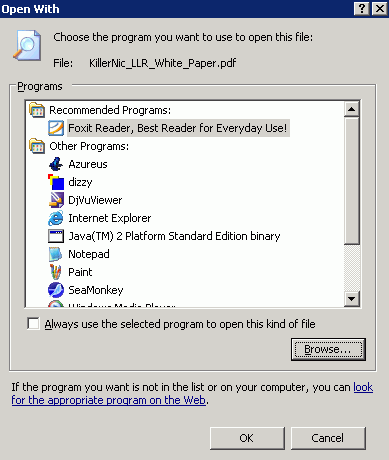 Click on button [Browse...] to select newly created "doknir launcher" executable, check "Alway use the selected program to open this kind of file" and press OK. This means that from now on whenever we will double-click on PDF file, it will be displayed in doknir. We can repeat above steps for other file types. For example, I've associated 'doknir launcher' to the following file extensions: .PDF, .PS, .DJVU and .SXW. Nice, is it not?
[]
Tuesday, September 19, 2006
111 gibibytes of doknir, s'il vous plait
According to the http://torrent.vmware.com:6969/, more than 100 GiB of doknir were downloaded. BTW, size of doknir.zip is 772 MiB.
Friday, August 04, 2006
OpenOffice Viewer
In posts about Crystal Reports and Word 2007 I brought up an issue of printer metrics (and page layout) so I've searched about "printer independent layout". I've discovered a document titled "Printer Independent Layout" [2003-MAR-12] on the following page: "Spec Proposals for OOo 1.1.x".
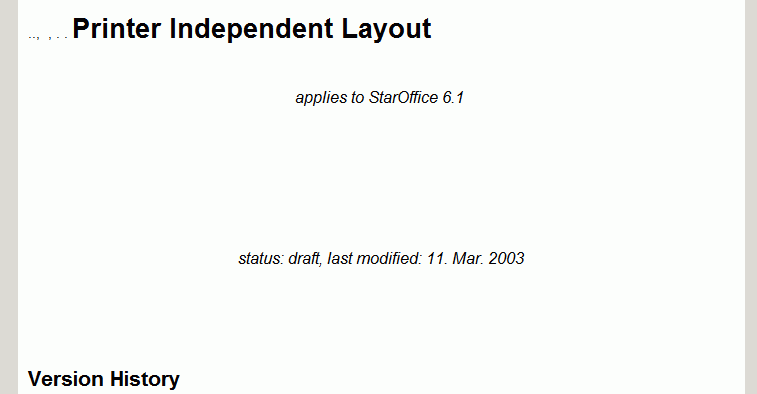
Document has an extension SXW and I have no application associated to it in my Windows environment. According to the Wikipedia, SXW is acronym for StarOffice XML Writer and it is the file extension for OpenOffice.org text files. Is there a tiny SXW viewer for Windows? Yes, it is: Visioo-writer - Visionneuse OpenOffice.org, but it is still in development (version 0.6.1). It is based on Python and here is a result (part of the first page):
What happens if we want to print the SXW file via doknir? This:
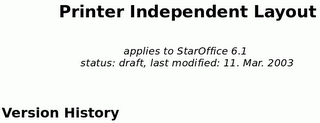 We can see that KWord was not able to display SXW document correctly.
BTW, here is the abstract of the above document:
Document has an extension SXW and I have no application associated to it in my Windows environment. According to the Wikipedia, SXW is acronym for StarOffice XML Writer and it is the file extension for OpenOffice.org text files. Is there a tiny SXW viewer for Windows? Yes, it is: Visioo-writer - Visionneuse OpenOffice.org, but it is still in development (version 0.6.1). It is based on Python and here is a result (part of the first page):
What happens if we want to print the SXW file via doknir? This:
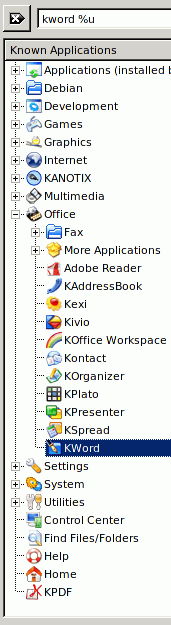
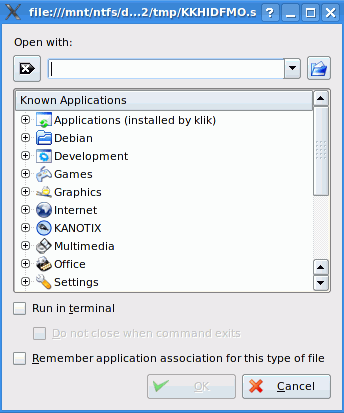 In Kanotix there is no default application for SXW extension, so let's select KWord, which is currently default for DOC file type:
 And this is the result:
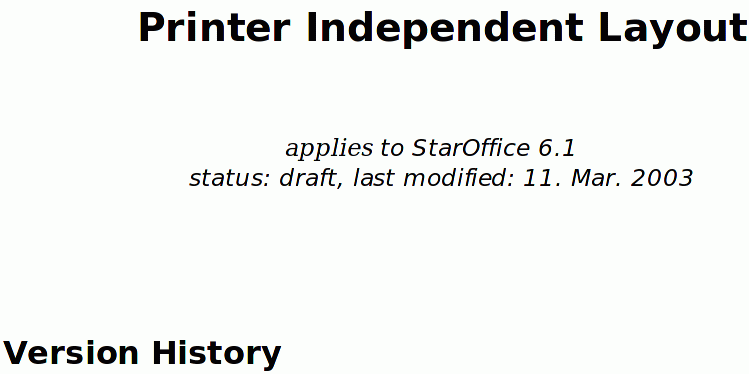 This is much better than Visioo-Writer, but still not perfect: If we take a closer look:
 we can see that letters a, i, e in word "applies" are different from the letters in "StarOffice"
To be sure, if this is correct or not, we have to install OpenOffice:
- sux
- apt-get update
- apt-get install openoffice.org
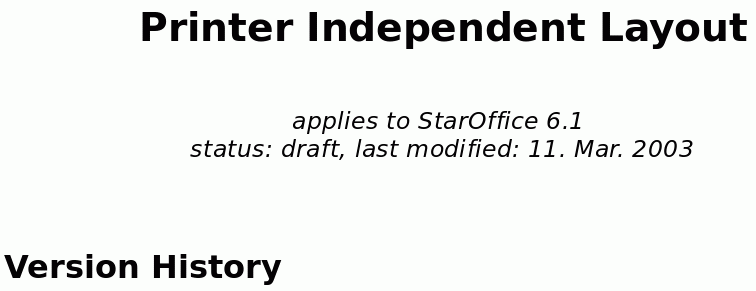
...Quite a lot of megabytes just to view SXW file ;). In my case, version 2.0.3-6 was installed - here is the current changelog. Anyhow, the following screenshot shows how the above document is displayed in OpenOffice Writer, which is now the default application for SXW extension:
Need to get 96.4MB of archives.
After unpacking 219MB of additional disk space will be used.
...
 We can see that KWord was not able to display SXW document correctly.
BTW, here is the abstract of the above document:
Many users complain about changing layouts of their document once these documents are printed to different printers or even on different driver versions of one and the same printer.
Even if this behaviour is technically correct (due to different printer and font metrics) it is confusing for the user. This is especially true if the number of pages increases or decreases.
To avoid such re-formatting a printer independent layout mode will be introduced.
As a side-effect we will buy in better MS Office compatibility ;o)
IMHO this behaviour is technically correct if you are a printer. But I'm not a printer and for me technically correct means that page layout does not change when changing printer. Fortunately this is the default in the latest OpenOffice:
 []
[]
Thursday, August 03, 2006
Incoming folder
Programming is one of the most
difficult branches of applied mathematics;
the poorer mathematicians
had better remain pure mathematicians.
--- EDSGER WYBE DIJKSTRA, How do we tell truths that might hurt? (1975)
Arrogance in computer science is measured in nanodijkstras.
--- ALAN KAY, ?
difficult branches of applied mathematics;
the poorer mathematicians
had better remain pure mathematicians.
--- EDSGER WYBE DIJKSTRA, How do we tell truths that might hurt? (1975)
Arrogance in computer science is measured in nanodijkstras.
--- ALAN KAY, ?
Implementation of the "right click" functionality was just the first step on our journey to the Grand Unification of the Host and her Guest. Today we are going to make the second step: "incoming folder".
As we can see in "Crystal Reports" or "Word 2007" examples, the following actions are required:
- open the folder
- find the file
- right-click on it
- select 'doknir' in pop-up menu
- We need to split method wodShellMenu1Click - new method is called CreateJob:
 procedure TForm1.wodShellMenu1Click(ASender: TObject;
   const Item: IMenuItem; const Name, Directory, Targets: WideString);
 var
    cFile: string;
 begin
    Memo1.Lines.Add(Directory);
    Memo1.Lines.Add(Name);
    Memo1.Lines.Add('['+Targets+']');
    if Pos(';',Targets)>0 then begin
       ShowMessage('Please select only one file!');
    end else begin
       if UpperCase(ExtractFileExt(Targets)) = '.LNK' Then begin
          cFile:=GetTarget(Targets);
          Memo1.Lines.Add(cFile);
       end else begin
          cFile:=Targets;
       end;
    end;
    CreateJob(cFile);
    Memo1.Lines.Add('------------------------------');
 end;    // wodShellMenu1Click


 procedure TForm1.CreateJob(cFile: string);
 var
    SearchRec: TSearchRec;
    cTmpFile, cJob, cJb, cFile2: string;
    nSize: integer;
    cExt, cExt2: string;
 begin
    nSize:=-1;
    if FileExists(cFile) then  begin
       if not Forms.Application.Active then
          Forms.Application.Restore;
       if WindowState=wsMinimized then WindowState:=wsNormal;
       Forms.Application.BringToFront;
       FindFirst(cFile, faAnyFile, SearchRec);   // +cExt.Caption
       if (Length(SearchRec.Name)>0) and (SearchRec.Size>0) then begin
          nSize:=SearchRec.Size;
          Memo1.Lines.Add('size='+IntToStr(nSize) ) ;
       end;
       FindClose(SearchRec);
       if nSize>50000000 then begin
         if MessageDlg('File '+cFile+' is large! Do you want to continue?',
          mtConfirmation,  [mbYes, mbNo], 0) <> mrYes then begin
             Memo1.Lines.Add('------------------------------');
             exit;
         end;
       end;
       cExt:=ExtractFileExt( cFile );
       if cExt<>'' then begin
          cFile2:=LeftStr(cFile, Length(cFile)-Length(cExt) );
          cExt2:=ExtractFileExt( cFile2 );
          if cExt2<>'' then cExt:=cExt2+cExt;
       end;
 //      ShowMessage(cExt);
       cTmpFile:=TmpFile( cTmpPath, cExt );
       try
          FileCopy(cFile,  cTmpFile);
       except
          ShowMessage('Error copy: '+cFile);
       end;
       if FileExists( cTmpFile ) then begin
          // create job (random file name)
          cJb:=TmpFile(cJobsPath,'.jb');
          cJob:=ChangeFileExt(cJb,'.job');
          Memo1.Lines.Add('job='+ cJob);
          with TIniFile.Create(cJob) do begin
             WriteString('doknir job', 'tmp file', ExtractFileName(cTmpFile));
             WriteString('doknir job', 'original file', cFile);
             UpdateFile;
             Free;
          end;
          RenameFile(cJb, cJob);
       end;
    end;
end; // CreateJob- We need a function to get "My Documents" folder:
 function GetMyDocuments: string;
 var
    Res: Bool;
    Path: array[0..Max_Path] of Char;
 begin
    Res := ShGetSpecialFolderPath(0, Path, csidl_Personal, False);
    if not Res then raise
       Exception.Create('Could not determine My Documents path');
    Result := Path;
end; // GetMyDocuments- We need two timers: "TimerMon" and "TimerChg". They are disabled and with intervals 500 and 2500 ms, respectively. The first timer monitors "incoming folder". When a new file appears, it stops and starts the second timer which checks if the size of incoming file is changing. If not it stops, creates a job to send the document to the virtual appliance and it starts the first timer.
- Specific subfolder in "My documents" will be called [_doknir_] (so that it will be alphabetically on the top in the list of folders). The method FormCreate has these new lines:
    cMyDok:=GetMyDocuments()+'\[_doknir_]';
    bFindFirst:=TRUE;
TimerMon.Enabled:=TRUE; // start monitor cMyDok- And finally, here are two methods for the timer events:
procedure TForm1.TimerMonTimer(Sender: TObject);
// monitor incoming folder
var
   nRes: integer;
begin
   TimerMon.Enabled:=FALSE;
   if bFindFirst then begin
      nRes:=FindFirst(cMyDok+'\*.*', faArchive , srDok);
   end else begin
      nRes:=FindNext(srDok);
   end;
   if (nRes=0) then begin
      if bFindFirst then begin
         Memo1.Lines.Add('--------------');
         Memo1.Lines.Add('findfirst: '+srDok.Name+
            '  size='+IntToStr(srDok.Size) );
         bFindFirst:=FALSE;
      end;
      if (srDok.Name<>'.') and (srDok.Size>0) then begin
          TimerChg.Enabled:=TRUE;
      end else begin
          TimerMon.Enabled:=TRUE;
      end;
   end else begin  // nRes<>0
      if not bFindFirst then begin
         bFindFirst:=TRUE;
         FindClose(srDok);
      end;
      TimerMon.Enabled:=TRUE;
   end;
end;   // TimerMonTimer

procedure TForm1.TimerChgTimer(Sender: TObject);
// is size of file changing ...
var
   nSize: Int64;
   fs: TFileStream;
   cTo: string;
begin
   TimerChg.Enabled:=FALSE;
   Memo1.Lines.Add('incoming: '+srDok.Name);
   fs:=NIL;
   try
      nSize:=-1;
      fs:=TFileStream.Create(cMyDok+'/'+srDok.Name,
      fmOpenRead+fmShareDenyNone);
      nSize:=fs.Size;
   finally
      fs.Free;
   end;
   Memo1.Lines.Add('stream size: ' + IntToStr(nSize) );
   if (srDok.Size=nSize) then begin // size ok
      cTo:=cMyDok+'/done/'+srDok.Name;
      Memo1.Lines.Add('size ok: '+IntToStr(nSize) );
      if FileExists(cTo) then
         DeleteFile(cTo);  // temporary ***
      if RenameFile(cMyDok+'/'+srDok.Name, cTo) then begin
         CreateJob(cTo);
      end;
   end;
   TimerMon.Enabled:=TRUE;  // monitor for next file
end;   // TimerChgTimer
So, from now on, every time we save or put a document into the subfolder [_doknir_] of folder "My Documents", it will appear in the virtual appliance.
[]